
Best eSIM for Malaysia — Instant Data Plans
Malaysia eSIMs from LTE.app start at $1.20 and activate in under 2 minutes on Maxis and Celcom (also Digi) — no contract, no airport SIM kiosk, no roaming bill.
Malaysia's mix of modern KL skyscrapers, Penang street food, and Borneo rainforests makes it one of Southeast Asia's most diverse destinations — and connectivity keeps up with all of it.
Right now in Kuala Lumpur
Live conditions to help you pack — refreshed daily.
Observed at 10:30 (Asia/Kuala Lumpur) · Weather & air-quality data by Open-Meteo (CC BY 4.0).
Malaysia travel essentials
Quick reference travellers ask us about most. Pair it with your eSIM and you’re ready to land.
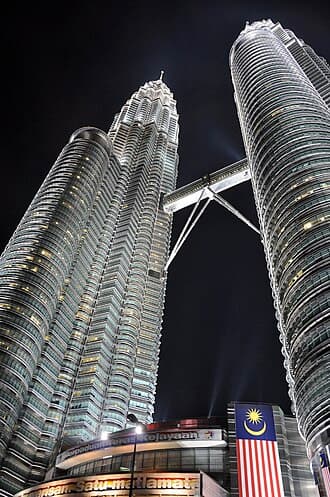
Malaysia is a country in Southeast Asia, on the Malay Peninsula, as well as on northern Borneo. The country is one of Asia's tiger economies, having seen great economic and human development during the last several decades. While the capital Kuala Lumpur is a cosmopolitan city, deep jungles cover vast swaths of the land, and the offshore islands are home to pristine beaches and some of the world's best scuba diving sites. Malaysia is also a foodie's paradise, with its diverse ethnic groups contributing to an incredibly rich culinary heritage.
Reference data from Wikivoyage and public references (CC BY-SA 4.0). Verify before travel; emergency numbers and rules can change. Wikivoyage and public references ↗
Your calls stay on your home number.
Your data runs on LTE.app.
Most modern iPhones and Android phones support two connections at once. Keep your existing SIM active — your number never changes, your apps keep working. Just add a Malaysia data plan on top.
- ✓ Calls and texts work normally
- ✓ WhatsApp, iMessage unchanged
- ✓ Bank 2FA still arrives
- ✓ Nothing to cancel or port
- ✓ Full 4G / 5G speeds
- ✓ Hotspot included
- ✓ Activates the moment you land
- ✓ From $1.20 — not $10–15/day
- ✗ ~$10–15 per day, every day
- ✗ Throttled after 512 MB
- ✗ No hotspot on most plans
- ✗ Bill shock when you get home
Available Plans (20)
Why LTE.app
Top cities in Malaysia
Same eSIM, full coverage. Tap a city for local connectivity tips, neighbourhoods, and transit notes.
Major airports in Malaysia
Activate before you board. Each airport guide covers Wi-Fi, ground transport, and arrival tips.
Best eSIM for Malaysia — what you need to know
LTE.app offers 20 eSIM plans for Malaysia, starting from $1.20. Plans are instant — purchase, scan the QR code in Settings, and your data is live. No physical SIM, no airport queue, no contract.
Coverage is provided through Maxis and Celcom and Digi, giving you data across Kuala Lumpur, Penang, Langkawi and beyond. Maxis and Celcom cover Peninsular Malaysia and East Malaysia (Sabah, Sarawak) reliably with 4G.
Why use an eSIM in Malaysia?
Malaysia eSIM coverage & networks
LTE.app plans in Malaysia route through Maxis, Celcom, Digi, U Mobile. Maxis and Celcom cover Peninsular Malaysia and East Malaysia (Sabah, Sarawak) reliably with 4G.
Major destinations covered include Kuala Lumpur, Penang, Langkawi, Kota Kinabalu, and Johor Bahru. Urban areas and popular tourist sites generally have reliable 4G LTE; rural and mountainous areas may vary.
More questions about Malaysia eSIMs
Does the eSIM work as a hotspot in Malaysia?+
Hotspot supported.
Does the Malaysia eSIM include a phone number?+
Data-only — no Malaysian number.
Which network will my eSIM use in Malaysia?+
LTE.app plans in Malaysia use Maxis and Celcom and Digi. The network your device connects to depends on your plan and device compatibility.
Can I top up or extend my Malaysia eSIM?+
Some plans allow top-ups or extensions from within the LTE.app. If you run out of data, you can purchase an additional plan — the new eSIM will be delivered instantly as a QR code.
Travelling nearby?
Extend your trip or compare plans for neighbouring destinations.
 Singapore eSIM →
 Thailand eSIM →
 Indonesia eSIM →
 Brunei eSIM →
Malaysia eSIM vs nearby destinations
How Malaysia eSIM coverage and pricing stack up against neighboring travel destinations. Tap a country to see its own plans and full coverage breakdown.
| Country | Carriers | From | |
|---|---|---|---|
| Malaysia← this page | Maxis · Celcom | $1.20 | |
| Singapore | Singtel · StarHub | See plans | Plans → |
| Thailand | AIS · DTAC | See plans | Plans → |
| Indonesia | Telkomsel · XL Axiata | See plans | Plans → |
| Brunei | local carriers with 4G/LTE coverage | See plans | Plans → |
 Malaysia
 Singapore
 Thailand
 Indonesia
 Brunei
Carrier list is the primary partner network in each country; plans on smaller destinations may also fall back to additional roaming partners. "From" price refers to the cheapest published LTE.app plan — see each country page for current rates.
Going to Malaysia? Pick the right plan for how you travel.
Different travelers need different eSIM sizes and features. Pick your travel style:
What you need to know
This eSIM provides data access only. It does not include a Malaysia phone number. Use WhatsApp, FaceTime, or Signal for calls.
Set up the eSIM at home over Wi-Fi before your trip. Data only starts counting once you connect to a local network on arrival.
Mobile hotspot is available on most Malaysia plans. Share your data with a laptop or travel companion without extra cost.
Your phone must be eSIM-compatible and carrier-unlocked. Most iPhones from 2018 and flagship Android phones from 2020 support eSIM.
Your QR code is emailed the moment your payment completes — no waiting, no shipping, no airport queue.
How to install your Malaysia eSIM
Note for Malaysia: Install before landing at KLIA or PEN. If visiting Sabah or Sarawak, Celcom has the best East Malaysia coverage.
Full install guide with screenshots →Love the price? The savings don't stop when you land home.
Pro and Premium subscribers save up to 12% on every plan they ever buy — whether they're in Malaysia next week or somewhere else next year. One membership. Every destination.
Frequently Asked Questions
Can I use an eSIM in Malaysia?
When does my Malaysia eSIM activate?
Can I use mobile hotspot (tethering) in Malaysia?
Can I use my regular SIM and the Malaysia eSIM at the same time?
How fast is the data in Malaysia?
Do I need to show ID to buy a Malaysia eSIM?
Does the Malaysia eSIM include a phone number?
Can I buy more data if I run out in Malaysia?
When should I install the eSIM?
What is the refund policy?
Will my device work in Malaysia?
Can I transfer the eSIM to another device?
Need help choosing?
Ask Smart Coach about the best eSIM plans for Malaysia, compare carriers, get installation help, and more.
Malaysia travel connectivity
All Malaysia pages — linked for faster research